It has been wonderful to work with our upper grades teachers in technology this year. Here is a quick rundown of some of our current projects!
8th grade - Ultimate Gift research and presentations
7th grade - Marian Shrine project (in progress), online testing for Mr. Callus
6th grade - Europe in a Box (using Chromebooks!)
5th grade - online Moodle testing, Google Presentations training
4th grade - Saints project (just about to start!)
Electives - Fine Arts photography elements (in progress, using Chromebooks!), Astronomy elective plants project (using Chromebooks!)
We have many projects in the works including a 7th grade Language Arts project, several 7/8th grade math projects, and much more!
Tuesday, September 30, 2014

StMM Technology Training for Parents!
Dear Parents,
We are happy to be offering training in two initial sessions on our new Google Drive account. A flyer was sent out via RenWeb yesterday, but here it is for your reference!
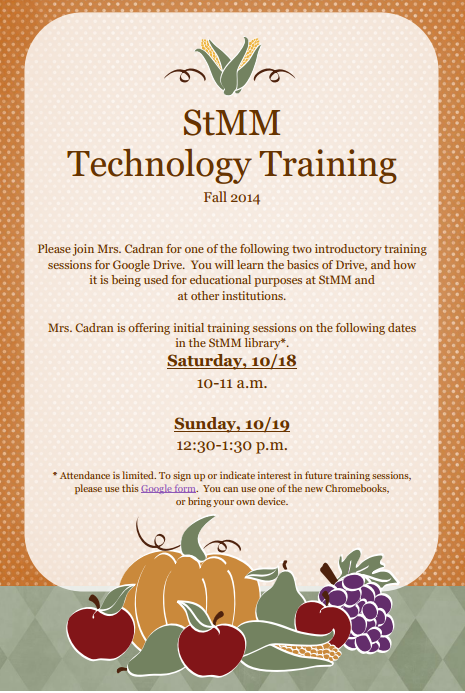
We are happy to be offering training in two initial sessions on our new Google Drive account. A flyer was sent out via RenWeb yesterday, but here it is for your reference!
You can use this Google Form to sign up or indicate interest in future sessions if these dates do not work for your schedule!
Thursday, September 4, 2014
9/4 Parent Newsletter - Re-Posting Google Document
Good morning, and happy Thursday!
We would like to repost the link to the Google document shared in the September 4 Parent Newsletter. You can find it here. Thank you, and have a blessed day!
We would like to repost the link to the Google document shared in the September 4 Parent Newsletter. You can find it here. Thank you, and have a blessed day!
Wednesday, September 3, 2014
8th Grade Religion Projects!
It was a pleasure to work with the 8th grade in the lab this past week, using our new on-demand schedule. Our 8th graders were putting together proposals and presentations for their Ultimate Gift Service Project, and did a wonderful job utilizing our new Google Drive accounts! The best part is that because they could share their work with Mrs. Blum, she was able to access and view it from her own Google account.
This project took almost 6 weeks last year, but with our new system, and the implementation of Google Drive, students were in the lab for about 4 class periods, over the span of one week, leaving a lot of open time for other grades to come to the lab when they were finished. Next up, we'll be working with 6th grade on their Europe in a Box project!
This project took almost 6 weeks last year, but with our new system, and the implementation of Google Drive, students were in the lab for about 4 class periods, over the span of one week, leaving a lot of open time for other grades to come to the lab when they were finished. Next up, we'll be working with 6th grade on their Europe in a Box project!
Monday, August 18, 2014
Back to School Resources!
As we begin our school year, please use these resources, including several video tutorials, to help you navigate our suite of technology products. New students will receive their User ID's and passwords within the first week of school.
Thank you,
The StMM Technology Team
Additionally, we have put together an informational video with a brief tour of Google Drive for you! Login details will also be shared within the first week of the school year.
Google Drive for StMM
Thank you,
The StMM Technology Team
·
Sign into RenWeb Student Account with your Student ID number and
password. Remember, if passwords need to reset, they will always be set to
Stmm2013! (With the exclamation mark!)
·
RenWeb is primarily used for class lesson plans, homework, grades,
lunch and financial notices, behavior, and school wide information.
·
Our district code is: stmm-nc.
Always click to join as a “student.”
·
This is the link you will use to log into
Moodle. Use your student ID number and the password Stmm2014! (With the
exclamation mark).
·
Click on
"My Courses" to find your class pages.
·
Moodle
allows teachers to post files, resources, web links, and documents for student
use in a logical, organized format. Teachers may also choose to utilize
assignment and assessment features.
·
Please note
that because Moodle is tied to our RenWeb accounts, using Moodle.com, or
Moodle.org will not work for logging in and connecting to your classes.
·
Several
tutorial videos may help you when getting started with Moodle:
Additionally, we have put together an informational video with a brief tour of Google Drive for you! Login details will also be shared within the first week of the school year.
Google Drive for StMM
Friday, August 15, 2014
Welcome Back, from the StMM Technology Lab!
Greetings, StMM Community!
As we begin another school year, I would like to take a moment to share news and notes from the StMM Computer Lab in the link below:
StMM Computer Lab Welcome Back 2014!
I will be using this blog throughout the year, as well as RenWeb e-mail, and the Principal's Update Letter when necessary, to share important resources and help for making this school year a success at school and at home. What is most important to me, is that your child is safe online, wherever he or she is using technology. To that end, please take a look at the resources posted last year, and some information about how StMM strives to help our students make good choices. Thank you!
~Mrs. Cadran
The StMM Technology lab, in conjunction with our guidance department, promote Internet Safety and responsible use of technology with our students throughout the school year. Some of these activities include:
Review of StMM Technology Policy
Annual Internet Safety Week
2011 Presentation
The 2012 Internet Safety Week’s focus was on what technology our students are using and how often. This report and this video formed the basis for class discussions.
2013 Presentation with Results of cyberbullying survey
Research Ethics Lessons
Plagiarism, Copyright and Fair Use Lessons
Permanent Internet Safety Section on every middle school Moodle page
and the creation of a new Technology Group for middle school students interested in promoting
Internet Safety through responsible use of Technology at StMM.
These are a few additional links and resources to help you promote these issues at home:
As we begin another school year, I would like to take a moment to share news and notes from the StMM Computer Lab in the link below:
StMM Computer Lab Welcome Back 2014!
I will be using this blog throughout the year, as well as RenWeb e-mail, and the Principal's Update Letter when necessary, to share important resources and help for making this school year a success at school and at home. What is most important to me, is that your child is safe online, wherever he or she is using technology. To that end, please take a look at the resources posted last year, and some information about how StMM strives to help our students make good choices. Thank you!
~Mrs. Cadran
The StMM Technology lab, in conjunction with our guidance department, promote Internet Safety and responsible use of technology with our students throughout the school year. Some of these activities include:
Review of StMM Technology Policy
Annual Internet Safety Week
2011 Presentation
The 2012 Internet Safety Week’s focus was on what technology our students are using and how often. This report and this video formed the basis for class discussions.
2013 Presentation with Results of cyberbullying survey
Research Ethics Lessons
Plagiarism, Copyright and Fair Use Lessons
Permanent Internet Safety Section on every middle school Moodle page
and the creation of a new Technology Group for middle school students interested in promoting
Internet Safety through responsible use of Technology at StMM.
These are a few additional links and resources to help you promote these issues at home:
Childnet International (http://www.childnet-int.org)
provides safety guidelines, publications, and current information for
parents and schools on how to keep the Internet a safe place for
children.
Connexions (http://cnx.org) is a place to view and share educational material made of small knowledge chunks called modules that can be organized as courses, books, reports, and so forth. Anyone may view or contribute.
CyberSmart! (http://www.cybersmart.org/home) fosters 21st-century skills to increase student engagement and prepare students to achieve in today’s digital society.
EDUCAUSE (http://www.educause.edu/) promotes the use of technology as a means to further one’s intelligence and personal learning. This site is a wealth of resources that effectively uses various technologies.
The Federal Communications Commission
(http://www.fcc.gov) Web site allows parents and educators to investigate and examine information regarding the many bureaus and agencies associated with keeping children safe while they use the Internet.
The Federal Trade Commission
(http://www.ftc.gov/bcp/edu/pubs/business/idtheft/bus45.shtm) provides an extensive amount of information that is valuable to businesses, agencies, and organizations. This site details how a student’s privacy while working online must be protected and kept confidential.
GetNetWise from the Internet Education Foundation (http://www.security.getnetwise.org) provides tips, tools, and actions for keeping the Internet safe and secure. Information is also provided on the ways to keep personal computers free from unwanted or inappropriate materials found on the Internet.
The NetSafeKids site from the National Academy of Sciences (http://www.nap.edu/netsafekids) allows parents and educators the opportunity to study and research the many ways children can be kept safe as they explore the Internet for educational purposes and entertainment.
WiredSafety (http://www.wiredsafety.org) is the world’s largest Internet safety, help, and education resource.
~Mrs. Cadran
Connexions (http://cnx.org) is a place to view and share educational material made of small knowledge chunks called modules that can be organized as courses, books, reports, and so forth. Anyone may view or contribute.
CyberSmart! (http://www.cybersmart.org/home) fosters 21st-century skills to increase student engagement and prepare students to achieve in today’s digital society.
EDUCAUSE (http://www.educause.edu/) promotes the use of technology as a means to further one’s intelligence and personal learning. This site is a wealth of resources that effectively uses various technologies.
The Federal Communications Commission
(http://www.fcc.gov) Web site allows parents and educators to investigate and examine information regarding the many bureaus and agencies associated with keeping children safe while they use the Internet.
The Federal Trade Commission
(http://www.ftc.gov/bcp/edu/pubs/business/idtheft/bus45.shtm) provides an extensive amount of information that is valuable to businesses, agencies, and organizations. This site details how a student’s privacy while working online must be protected and kept confidential.
GetNetWise from the Internet Education Foundation (http://www.security.getnetwise.org) provides tips, tools, and actions for keeping the Internet safe and secure. Information is also provided on the ways to keep personal computers free from unwanted or inappropriate materials found on the Internet.
The NetSafeKids site from the National Academy of Sciences (http://www.nap.edu/netsafekids) allows parents and educators the opportunity to study and research the many ways children can be kept safe as they explore the Internet for educational purposes and entertainment.
WiredSafety (http://www.wiredsafety.org) is the world’s largest Internet safety, help, and education resource.
~Mrs. Cadran
Friday, May 2, 2014
6th Grade Fakebook Project has Begun! Details and Overview
Dear
Parents,
I hope
you had a restful break. Mrs. Wilson has assigned historical figures to all 6th
graders this week and the project was explained in detail during class
technology time this week as well. I wanted to send this to you as a way to
communicate some important information and helpful resources as we get things
moving along.
Mrs.
Wilson will be grading the majority of work for this project, but I will be
assigning weekly participation grades on a scale of 10 points to document how
students are utilizing class time over the next few weeks. Scores of 8/10 or
lower will receive a comment in my RenWeb gradebook as an explanation.
There
is information about the project in my RenWeb pages (lesson plans, homework),
and in full on Mrs. Wilson's Moodle page.
The
project has three phases in its timeline:
1. Personal
Research done and uploaded by 5/7 to the individual forum in Moodle. Students
will use the Word document Research Checklist they were shown in class, found on
Mrs. Wilson's Moodle page.
2.
Personal Fakebook pages will be opened on 5/7 (or when research has been
submitted) and students will have until 5/16 to update them.
3.
5/16-5/30 students may comment on other Fakebook pages
Project
done by 5/30
Helpful
resources, also all found on Moodle.
At
the beginning of the school year, students were asked to bring in library card
information. This will allow them to access databases for Wake County. All
students have been shown how to do this. The link to the databases (they should
use the Teen database list) is here:
And
a video tutorial we watched in class together is here:
Students
are not required to use databases, but they are strongly encouraged as good
sources of reputable information.
Also,
the link to the file for project directions and help is here:
Students
are encouraged to look through all available resources and ask questions via an
individual forum in Moodle if they need help, rather than wait until their next
technology class. They will not be able to get all project work done just in
technology and should plan to work at home as often as needed, as this is a
social studies project.
Thank
you again for your support - we are very excited about this project!
Mrs.
Cadran and Mrs. Wilson
Subscribe to:
Posts (Atom)